Callback for inter module communication
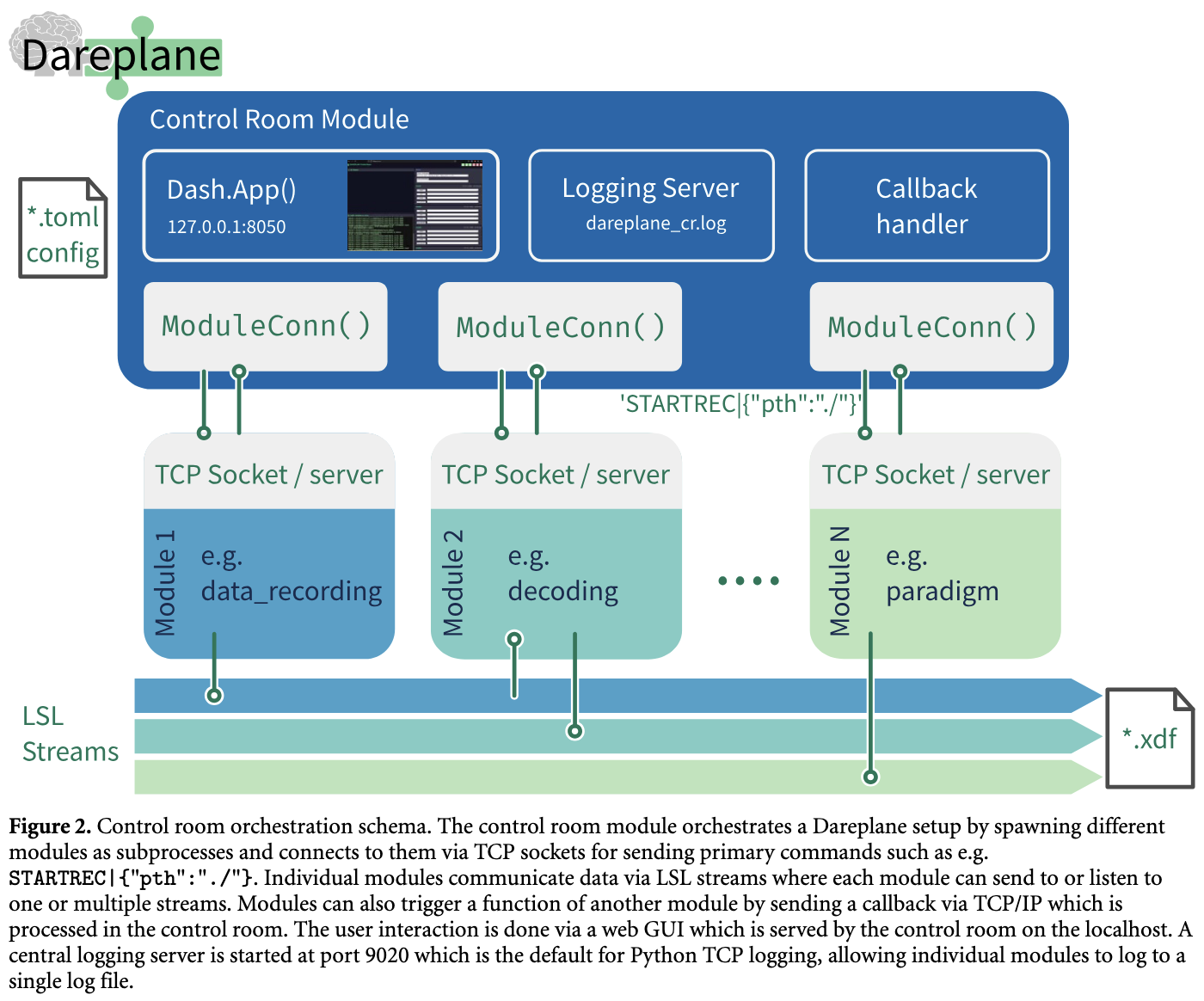
The Dareplane control room provides a callback handler which allows individual modules to invoke primary commands (PCOMMS) of other modules.
For this purpose, a message is sent to the control room via the existing TCP connection. E.g. module N (paradigm) could start the data recoding from module 1 by sending the following message:
module-1|STARTRECORD|{'filename':'mytargetfile.xdf'}This assumes two things:
module-1is the name ofmodule 1within the control room configuration. E.g. this configuration would create a module with internal namemodule-1:
[python.modules.module-1]
    type = 'io_data'
    port = 8081
    ip = '127.0.0.1'
module 1implements a primary command forSTARTRECORDwhich also accepts a keyword argument forfilename.
Use case example Python
Assume we have a controller module which needs to switch some stimulation (ON/OFF) via a stimulator module - like what is done in the dp-bollinger-control.
Within the controller we can store the Dareplane server within a context helper class:
from dataclasses import dataclass
from dareplane_utils.default_server.server import DefaultServer

@dataclass
class Context:
    server: DefaultServer
Now the context can for example be initialized during the server startup of the controller model. The default folder structure for Dareplane would have a server.py for this purpose, e.g.:
dp-controller
├── api
│   └── server.py
├── controller
Then within the server.py we would have:
from functools import partial

from dareplane_utils.default_server.server import DefaultServer
from fire import Fire

from controller.main import run_bollinger_control
from controller.utils.logging import logger
from controller.utils.context import Context


def main(port: int = 8080, ip: str = "127.0.0.1", loglevel: int = 10):
    logger.setLevel(loglevel)
    server = DefaultServer(
        port, ip=ip, pcommand_map={}, name="bollinger_control_server"
    )
    ctx = Context(server=server)

    # Thread needs access to the server for sending back
    pcommand_map = {
        "STARTCONTROL": partial(run_bollinger_control, ctx=ctx),
    }

    server.pcommand_map.update(pcommand_map)

    # initialize to start the socket
    server.init_server()
    # start processing of the server
    server.start_listening()

    return 0


if __name__ == "__main__":
    Fire(main)
This allows to use the following invocation within the run_bollinger_control function (finally as part of the process_loop):
# ... from create_control_cmd_ao
payload = dict(
    StimChannel=scfg["stim_channel"],
    FirstPhaseDelay_mS=scfg["first_phase_delay_ms"],
    FirstPhaseAmpl_mA=scfg["first_phase_ampl_mA"],
    FirstPhaseWidth_mS=scfg["first_phase_width_ms"],
    SecondPhaseDelay_mS=scfg["second_phase_delay_ms"],
    SecondPhaseAmpl_mA=scfg["second_phase_ampl_mA"],
    SecondPhaseWidth_mS=scfg["second_phase_width_ms"],
    Freq_hZ=scfg["freq_hz"],
    Duration_sec=scfg["duration_s"],
    ReturnChannel=scfg["return_channel"],
)

cmd = f"{cfg['stim']['dp_module_name']}|STARTSTIM|{payload}"
#...

if ctx.server is not None:
    logger.debug("Sending cmd to control room")
    ctx.server.current_conn.sendall(cmd.encode())
    ctx.marker_outlet.push_sample([cmd]) # option: logging the command to an LSL outlet
Note: The lifetime management in the server.py of the dp-bollinger-control is slightly different, as the Context instance is used to track more objects than just the TCP connection/server. We therefore forward only the server to the run_bollinger_control which then instantiates a Context internally. How you do the lifetime management is up to you, but the server usually just available when the modules is started via python -m api.server.